


Finding the best cameras for seniors means prioritizing ease of use, clear controls, and reliable performance. Our guide simplifies the selection process, highlighting features like image stabilization, large screens, and intuitive menus to ensure a satisfying and effortless photography experience. Whether for capturing family moments or scenic views, the right camera enhances enjoyment without unnecessary complexity, making photography accessible and fun for everyone.
Photography is a wonderful hobby that allows us to capture life’s precious moments, from family gatherings and beautiful landscapes to everyday joys. For seniors, a camera can be a gateway to creativity, a tool for preserving memories, and a way to share their unique perspective with loved ones. However, navigating the vast world of digital cameras can feel overwhelming, with countless models boasting complex features and intimidating controls.
This guide is here to simplify that journey, helping you discover the best cameras for seniors. We understand that “best” isn’t about the most features or the highest price tag; it’s about finding a camera that is easy to use, comfortable to hold, and delivers satisfying results without a steep learning curve. We’ll focus on what truly matters for a senior photographer, ensuring that the camera enhances their experience rather than complicates it.
Whether you’re looking for a simple point-and-shoot to document grandchildren’s milestones, a more advanced option for travel photography, or just something fun and instant, we’ve got you covered. Our goal is to empower seniors to enjoy photography to the fullest, making it an accessible and rewarding part of their lives. Let’s dive in and find the perfect camera that brings joy and ease to capturing every moment.
Key Takeaways
- Ease of Use is Paramount: The most important factor for seniors is a camera that’s intuitive, with straightforward menus and easily identifiable buttons, minimizing frustration and encouraging more photo-taking.
- Prioritize Ergonomics and Handling: Cameras with a comfortable grip, reasonable weight, and large, well-spaced controls are crucial for seniors, especially those with dexterity challenges.
- Image Stabilization is a Must-Have: To combat natural hand tremors and ensure sharp photos in various lighting conditions, optical image stabilization (OIS) or in-body image stabilization (IBIS) is highly recommended.
- Look for Clear, Bright Displays: A large, high-resolution LCD screen, possibly with touch functionality, makes framing shots and reviewing photos much easier on the eyes.
- Simplicity Over Complexity: Avoid cameras with an overwhelming number of modes or advanced settings. Automatic modes that do the heavy lifting are often preferred, letting seniors focus on the moment.
- Consider Connectivity Features: Built-in Wi-Fi or Bluetooth can be incredibly helpful for easily transferring photos to smartphones or computers for sharing with family and friends.
- Durability and Battery Life Matter: A robust camera that can withstand minor bumps and offers extended battery life reduces worries and ensures it’s always ready to capture memories.
Quick Answers to Common Questions
Which type of camera is generally easiest for seniors to use?
Compact point-and-shoot cameras are typically the easiest for seniors due to their automatic settings, simple controls, and portability.
Is image stabilization important for seniors?
Yes, image stabilization is highly important. It helps reduce blurry photos caused by camera shake, which can be particularly helpful for seniors who may experience hand tremors.
Should I consider a camera with Wi-Fi for a senior?
Absolutely! Wi-Fi connectivity makes it much easier to transfer photos wirelessly to a smartphone or computer, simplifying the process of sharing memories with family and friends.
What screen features are best for seniors?
A large, bright, and high-resolution LCD screen, preferably 3 inches or larger, is ideal. Touchscreens can also be very intuitive and user-friendly for many seniors.
Are instant cameras a good option for seniors?
Instant cameras are a fantastic option for seniors who enjoy the nostalgia of physical prints and the immediate gratification of seeing their photos develop right away. They are also incredibly simple to operate.
📑 Table of Contents
- What Makes a Camera “Senior-Friendly”? Prioritizing Ease of Use
- Types of Cameras to Consider for Seniors
- Top Features to Prioritize in Senior-Friendly Cameras
- Our Top Picks for Best Cameras for Seniors (General Recommendations)
- Beyond the Camera: Accessories and Tips for Enjoying Photography
- Conclusion: Capture Life’s Moments with Confidence
What Makes a Camera “Senior-Friendly”? Prioritizing Ease of Use
When searching for the best cameras for seniors, it’s crucial to shift focus from technical specifications to practical usability. A camera packed with advanced features is only good if it’s actually used and enjoyed. For many seniors, simplicity is key. Here’s what we mean by “senior-friendly” features:
Large, Clearly Labeled Buttons and Dials
Small, fiddly buttons can be a source of frustration, especially for those with reduced dexterity or vision. Look for cameras with generously sized buttons that are easy to press and clearly labeled with large, legible icons or text. Dials should offer a satisfying click when turned, making it clear which setting is being adjusted.
- Tip: Some cameras offer customizable buttons, allowing you to assign frequently used functions for quick access.
Intuitive Menu Systems
Complex menus with multiple sub-menus and jargon can quickly become overwhelming. The ideal senior-friendly camera will have a straightforward menu system that is easy to navigate, with clear, concise language. Auto modes that handle most settings automatically are a huge plus, allowing the photographer to simply point and shoot.
- Example: Many point-and-shoot cameras excel in this area, offering a “Scene Intelligent Auto” or similar mode that automatically detects the shooting situation (portrait, landscape, macro) and optimizes settings accordingly.
Comfortable Ergonomics and Grip
Holding a camera comfortably is essential for steady shots and prolonged use. Cameras with a textured grip, a good hand rest, and a weight that feels balanced (not too heavy, not too light) are preferable. Consider the camera’s size – some prefer a compact camera that fits in a pocket, while others appreciate a slightly larger body that’s easier to hold steady.
- Consideration: If the senior has arthritis or tremors, a lighter camera might be easier to manage, but a camera with a more substantial grip can also provide better stability.
Bright, High-Resolution LCD Screen
A clear, bright, and large LCD screen on the back of the camera is invaluable for framing shots and reviewing photos. Look for screens that are at least 3 inches diagonal and offer good resolution, making it easy to see details. Some cameras offer tiltable or vari-angle screens, which are fantastic for shooting from awkward angles or reducing glare.
- Benefit: Touchscreens can also be a significant advantage for seniors, as they often replicate the familiar smartphone experience, making navigation and focusing more intuitive.
Types of Cameras to Consider for Seniors
The camera market offers a wide variety of types, each with its own advantages. When looking for the best cameras for seniors, it helps to understand which categories might best suit different needs and preferences.
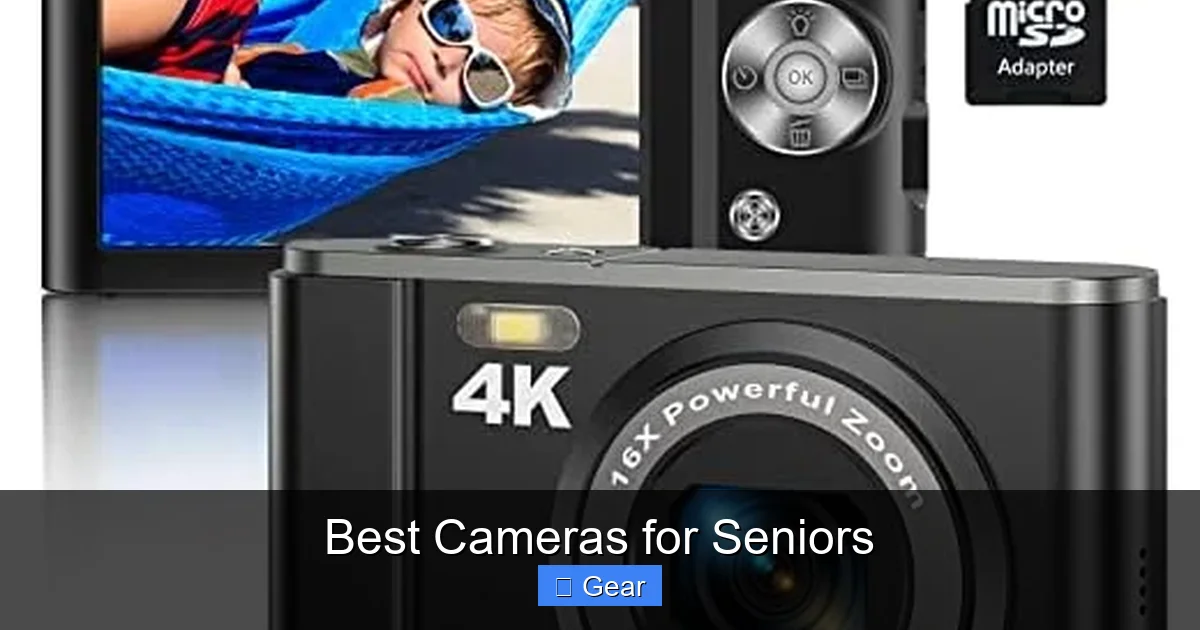
Visual guide about Best Cameras for Seniors
Image source: m.media-amazon.com
1. Compact Point-and-Shoot Cameras
These are often the go-to choice for simplicity. They are typically small, lightweight, and designed for automatic operation. Most feature a built-in lens, so there’s no need to worry about changing lenses. They’re excellent for everyday snapshots and travel where portability is key.
- Pros for Seniors: Extremely easy to use, often have robust auto modes, very portable, generally affordable.
- Cons for Seniors: Limited manual control (if desired), smaller sensors can struggle in very low light.
- Ideal for: Casual photographers who want minimal fuss and simply want to capture memories without learning complex settings.
2. Bridge Cameras
Bridge cameras offer a “bridge” between point-and-shoots and more advanced cameras. They look similar to DSLRs but have a fixed, powerful zoom lens. This means you get incredible versatility (from wide-angle to super-telephoto) without the need to carry or change multiple lenses.
- Pros for Seniors: Versatile zoom range, often have larger grips for better handling, manual controls are usually accessible but optional, generally good image quality.
- Cons for Seniors: Can be larger and heavier than point-and-shoots, still have many features that might go unused.
- Ideal for: Seniors who want more zoom capability than a point-and-shoot, enjoy capturing wildlife or distant subjects, but don’t want the complexity of interchangeable lenses.
3. Mirrorless Cameras (Entry-Level)
Entry-level mirrorless cameras offer excellent image quality and interchangeable lenses in a more compact body than a DSLR. They are becoming increasingly user-friendly, with good auto modes and electronic viewfinders (EVFs) that show you exactly what your photo will look like before you shoot.
- Pros for Seniors: Superior image quality to point-and-shoots, often have excellent image stabilization, increasingly intuitive touchscreens and controls.
- Cons for Seniors: Can be more expensive, interchangeable lenses add complexity and cost, still more features to learn.
- Ideal for: Seniors who have a keen interest in photography, want excellent image quality, and are comfortable with a slight learning curve, perhaps upgrading from a simpler camera.
4. Instant Cameras
For a different kind of fun, instant cameras offer immediate, tangible prints. They bring back the nostalgia of instant photography and are incredibly simple to operate. Just point, shoot, and watch your photo develop!
- Pros for Seniors: Incredibly simple, instant gratification with physical prints, fun for sharing immediately.
- Cons for Seniors: Image quality is generally not as high as digital, film can be expensive, limited control.
- Ideal for: Seniors who love physical memories, enjoy the novelty of instant prints, or want a fun, social camera for events.
Top Features to Prioritize in Senior-Friendly Cameras
Beyond the camera type, certain features can significantly enhance the experience for seniors. When comparing the best cameras for seniors, keep these in mind:
1. Optical Image Stabilization (OIS)
This is arguably one of the most important features. Image stabilization helps to reduce blur caused by camera shake, which is common and can be more pronounced with age. Optical Image Stabilization (OIS) physically moves lens elements to counteract movement, resulting in sharper photos, especially in lower light or when using zoom.
- Benefit: Minimizes blurry photos, leading to more keepers and less frustration. Look for cameras that specifically mention “Optical Image Stabilization” or “In-Body Image Stabilization (IBIS).”
2. Excellent Auto Mode Performance
A camera that excels in its “intelligent auto” or “scene recognition” modes means seniors can simply focus on composition without worrying about shutter speed, aperture, or ISO. The camera should reliably choose the best settings for a wide range of common scenarios.
- Look for: Dedicated “Auto” button or a prominent “Smart Auto” setting on the mode dial.
3. Connectivity (Wi-Fi and Bluetooth)
Being able to easily transfer photos to a smartphone, tablet, or computer for sharing with family is a huge plus. Wi-Fi and Bluetooth connectivity simplify this process, often allowing wireless transfer with just a few taps on a connected device. Some apps even allow remote control of the camera, which can be useful.
- Advantage: No more fumbling with cables or memory cards for sharing photos.
4. Good Battery Life
A camera that lasts all day on a single charge means less worry about missing a moment. Look for cameras with a CIPA rating of 300 shots or more. Removable batteries are also a good feature, allowing you to carry a spare for extended outings.
- Practical Tip: Always fully charge the battery before an important event or trip.
5. Durability and Weather Sealing (Optional but Nice)
While not strictly necessary for everyone, a camera with a robust build quality and some level of weather sealing can provide peace of mind, especially for active seniors who enjoy outdoor photography. It protects against splashes, dust, and minor bumps.
- Consideration: Even if full weather sealing isn’t a priority, a sturdy plastic or metal body feels better and is more resilient than flimsy construction.
Our Top Picks for Best Cameras for Seniors (General Recommendations)
Instead of specific model numbers that change rapidly, let’s look at categories and features that define the best cameras for seniors, offering reliable choices across different needs and budgets.
1. The Ultra-Simple Point-and-Shoot: For Everyday Memories
What to look for: A compact camera with a dedicated “Auto” mode, a clear 3-inch or larger LCD screen, and intuitive button layout. Image stabilization is a must. Wi-Fi for easy sharing is highly beneficial. Brands like Canon (PowerShot ELPH series), Nikon (COOLPIX A series), and Panasonic (LUMIX ZS series) often offer excellent options in this category.
- Why it’s great: It’s the ultimate grab-and-go camera. No complicated settings, just turn it on and shoot. Perfect for family events, casual outings, and keeping in a purse or pocket.
2. The Versatile Bridge Camera: For Zoom Enthusiasts
What to look for: A bridge camera with a large optical zoom range (e.g., 20x to 60x), a comfortable, DSLR-like grip, and excellent optical image stabilization. A bright electronic viewfinder (EVF) can be useful for bright conditions. Look at models from Panasonic (LUMIX FZ series), Sony (Cyber-shot RX10 series – higher end), or Nikon (COOLPIX B series).
- Why it’s great: Offers the ability to zoom in on distant subjects without needing to change lenses. Ideal for bird watching, sports events, or capturing details from afar. The larger body often provides a more stable hold.
3. The User-Friendly Mirrorless: For Budding Photographers
What to look for: An entry-level mirrorless camera with a large sensor for better image quality, in-body image stabilization (IBIS) or excellent lens-based OIS, a good electronic viewfinder, and a tilting/articulating touchscreen. Look for models from Canon (EOS R series entry-level), Sony (Alpha series entry-level), Fujifilm (X-A or X-T series entry-level), or Panasonic (LUMIX G series). Opt for a kit lens with optical stabilization.
- Why it’s great: Delivers superior image quality and more creative control than point-and-shoots, but with modern, user-friendly interfaces. It’s a great option for seniors who want to delve a little deeper into photography without being overwhelmed by a full-fledged DSLR.
4. The Instant Camera: For Immediate Fun and Tangible Memories
What to look for: A simple instant camera with easy loading film packs, and perhaps a small selfie mirror or close-up lens attachment. Models like Fujifilm Instax Mini or Square series, or Polaroid Go/Now are popular choices.
- Why it’s great: Provides instant, physical prints to share immediately. It’s a fun, nostalgic experience and perfect for parties, family gatherings, or scrapbooking.
Beyond the Camera: Accessories and Tips for Enjoying Photography
Choosing one of the best cameras for seniors is just the first step. To truly enjoy and make the most of photography, consider these accessories and tips:
Essential Accessories
- Camera Strap: A comfortable neck or wrist strap is vital for security and ease of carrying. Wider straps distribute weight better and prevent digging into the neck.
- Protective Case or Bag: Keeps the camera safe from bumps and scratches when not in use or during travel.
- Extra Battery: Never miss a shot because of a dead battery. A spare, fully charged battery is a wise investment.
- Large Capacity SD Card: Invest in a good quality, high-capacity SD card (e.g., 64GB or 128GB) so there’s plenty of space for photos and videos.
- Lens Cleaning Kit: A microfiber cloth and a blower brush are handy for keeping the lens free of dust and smudges, ensuring clear photos.
- Small Tripod or Monopod: For extra stability, especially in low light or for self-portraits, a lightweight, compact tripod or monopod can be very useful.
Tips for Enjoying Photography
- Practice Regularly: The more you use your camera, the more comfortable and confident you’ll become. Take it with you on walks, to family events, or even just around the house.
- Experiment with Auto Modes: Don’t be afraid to try different scene modes (e.g., portrait, landscape, macro) if your camera has them. They’re designed to help you get great shots easily.
- Review Your Photos: Look at your pictures on the camera’s screen or on a computer. See what you like and what you might want to improve next time.
- Print Your Favorites: Don’t let your cherished memories live only on a screen. Print out your best photos, create photo albums, or make personalized gifts. Many online services make this very easy.
- Share with Loved Ones: Photography is a great way to connect. Share your photos with family and friends, whether through social media, email, or by showing them prints.
- Join a Local Photography Group (Optional): If you’re looking for social interaction and want to learn more, a local camera club or photography group can be a fun way to engage with like-minded individuals.
Conclusion: Capture Life’s Moments with Confidence
Choosing the best cameras for seniors doesn’t have to be a daunting task. By focusing on ease of use, comfortable handling, and practical features like image stabilization and clear displays, you can find a camera that truly brings joy and simplicity to photography. Remember, the best camera is the one you will actually use and enjoy!
Whether it’s a straightforward point-and-shoot for daily snapshots, a versatile bridge camera for zooming in on distant wonders, or a simple instant camera for immediate gratification, there’s a perfect match out there. Empowering seniors with the right camera means giving them the ability to capture, cherish, and share life’s invaluable moments with confidence and ease. Happy snapping!
🎥 Related Video: DSLR Camera🔥Price in Bangladesh 2026 | Canon, Nikon, Sony Camera Price Update | Professional Cameras
📺 Thats Rahman
DSLR Camera Price in Bangladesh 2026 | Canon, Nikon, Sony Camera Price Update | Professional Cameras Are you looking …
Frequently Asked Questions
What is the most crucial factor when choosing a camera for an older adult?
The most crucial factor is ease of use. This includes having large, clearly labeled buttons, an intuitive menu system, and reliable automatic modes. A camera that is easy to pick up and use without extensive setup or learning will be the most appreciated.
How important is camera weight and size for seniors?
Camera weight and size are quite important for seniors, as a camera that is too heavy or too bulky can be uncomfortable to hold and carry for extended periods. Look for models with a comfortable grip and a manageable weight, balancing portability with stability.
Are expensive cameras always better for seniors?
Not necessarily. While more expensive cameras often offer advanced features and better image quality, these benefits may be offset by increased complexity. For seniors, a moderately priced camera that focuses on user-friendliness and essential features often provides the best value and experience.
What about smartphone cameras for seniors?
Smartphone cameras are excellent for convenience and instant sharing, and many seniors already use them effectively. However, dedicated cameras often provide superior optical zoom, better low-light performance, and more comfortable ergonomics, which can be advantageous for specific photography needs.
Should I look for a camera with an optical viewfinder?
An optical viewfinder can be beneficial for some seniors, especially those who prefer framing shots traditionally or struggle with glare on LCD screens. However, many modern cameras use electronic viewfinders (EVFs) which offer a live preview of the exposure and are also a great option.
How can I make sure a senior will actually use their new camera?
To encourage use, ensure the camera is truly simple and fits their comfort level. Spend time showing them the basic functions, print some of their first photos to celebrate their efforts, and encourage them to share their pictures with family and friends. Positive reinforcement and making it a fun activity are key.
